
Coinsnap Payment Plugins for BTCPay Server: Connect Your Shop or Website
Coinsnap develops Bitcoin payment plugins and modules for online shops, WordPress websites and other merchant applications. Many of these integrations give merchants a choice of payment provider: they can connect the plugin to a Coinsnap account or use their own BTCPay Server.
This means merchants can choose the setup that fits their technical requirements and operating model. Businesses that already run their own BTCPay Server can keep using their own infrastructure, while merchants who prefer not to operate a payment server themselves can use Coinsnap as a managed alternative.
Coinsnap strongly supports BTCPay Server and the open-source work behind it. We use and value BTCPay Server technology and want merchants who choose to operate their own server to be able to use Coinsnap’s shop and WordPress integrations as well.
What does “BTCPay Server support” mean here?
This article describes Coinsnap payment plugins and modules for eCommerce platforms and WordPress that can use a merchant’s own BTCPay Server as their payment provider.
The Coinsnap plugin is installed in the shop system or WordPress website.
The plugin then communicates with the merchant’s BTCPay Server through the BTCPay Server API.
The merchant can alternatively configure the same Coinsnap integration to use Coinsnap as the payment provider.
What Is BTCPay Server?
BTCPay Server is a free and open-source Bitcoin payment platform that merchants can host themselves. It creates and manages Bitcoin payment invoices while payments are sent to wallets controlled by the merchant.
A merchant can operate BTCPay Server on their own infrastructure, use cloud infrastructure or choose a third-party hosting solution. A self-hosted setup gives the operator extensive control over stores, payment methods, Bitcoin and Lightning infrastructure and integrations.
BTCPay Server itself does not charge a payment-processing fee. However, operating a server can involve infrastructure, hosting, administration and maintenance costs depending on the chosen deployment.
Why Connect a Shop or Website to BTCPay Server?
BTCPay Server provides the Bitcoin payment infrastructure, but an online shop, WordPress website or other merchant application still needs a technical integration that can create payment invoices, receive payment status updates and update the corresponding order or transaction.
A payment plugin or module provides this connection. Instead of building and maintaining a custom BTCPay Server integration, merchants can install a compatible Coinsnap module for their shop system or WordPress application.
The Coinsnap module handles the communication between the merchant application and the selected payment provider.
Two Ways to Use a Coinsnap Payment Plugin
Many Coinsnap payment integrations support two different operating models. The shop or website plugin remains the same; the merchant chooses which payment provider should process the Bitcoin payments.
Option 1: Use Your Own BTCPay Server
Choose this option if you already operate a BTCPay Server or want to manage your own Bitcoin payment infrastructure.
The Coinsnap plugin connects your shop or website directly to your BTCPay Server. Payment invoices are created through your server, and your BTCPay Server controls the payment-processing infrastructure.
This option is particularly suitable for merchants and developers who want maximum control over their infrastructure and are comfortable operating and maintaining a BTCPay Server environment.
Key points
- Use your own BTCPay Server
- No Coinsnap account required for the BTCPay Server connection
- No Coinsnap transaction fee for payments processed through your own BTCPay Server
- Full control over your BTCPay Server configuration
- Merchant remains responsible for operating and maintaining the BTCPay Server environment
Option 2: Use Coinsnap
Choose this option if you want to accept Bitcoin without deploying and maintaining your own BTCPay Server infrastructure.
Coinsnap provides the payment infrastructure as a managed service. The merchant connects a Bitcoin wallet or another supported settlement destination, installs the relevant Coinsnap plugin and uses Coinsnap to process Bitcoin payments.
This option is particularly suitable for merchants who want a fast setup and prefer Coinsnap to operate the underlying payment infrastructure.
Key points
- No self-hosted payment server required
- No server administration or BTCPay Server maintenance required
- Simple onboarding and plugin configuration
- Coinsnap merchant features and support available
- Coinsnap’s normal merchant pricing applies
Own BTCPay Server vs. Coinsnap
| Requirement | Own BTCPay Server | Coinsnap |
|---|---|---|
| Payment infrastructure | Operated by merchant / chosen host | Managed by Coinsnap |
| Coinsnap account required | No | Yes |
| Coinsnap transaction fee | No | Coinsnap pricing applies |
| Server operation | Merchant responsibility | Managed by Coinsnap |
| Updates and maintenance of payment server | Merchant / host responsibility | Managed by Coinsnap |
| Control over BTCPay infrastructure | Maximum | Managed service |
| Coinsnap shop / WordPress plugin | Yes | Yes |
| Suitable for | Self-hosters and technically independent operators | Merchants wanting a managed solution |
Both models allow merchants to use Coinsnap’s integration work. The difference is primarily who operates the payment infrastructure.
Coinsnap Payment Plugins That Support BTCPay Server
Coinsnap develops integrations for eCommerce systems, WordPress and other merchant use cases. Where BTCPay Server support is available, the merchant can select BTCPay Server as the payment provider in the plugin settings.
The same integration can therefore serve two groups: merchants using Coinsnap and merchants operating their own BTCPay Server.
Examples of Supported Shop Systems
Coinsnap provides Bitcoin payment modules for a growing range of eCommerce systems. Depending on the module, the merchant can use Coinsnap or connect their own BTCPay Server.
- WooCommerce
- Shopware
- Gambio
- PrestaShop
- Magento
- OpenCart
- Wix
- JTL Store
- Drupal
- Modified eCommerce
- Plentymarkets
For the current list of available modules and supported payment-provider options, see the Coinsnap Payment Plugins overview.
Bitcoin Payment Add-ons for Popular WordPress Plugins
Coinsnap also develops add-ons for established WordPress plugins. These integrations add Bitcoin payment functionality to applications that already provide forms, donations, memberships, downloads or other website functionality.
Depending on the integration, merchants can use Coinsnap as the payment provider or connect the add-on with their own BTCPay Server.
Examples include:
- GiveWP (donations)
- Contact Form 7, WPForms, Gravity Forms, Ninja Forms (contact forms)
- GetPaid
- Easy Digital Downloads
- Paid Memberships Pro
With these Coinsnap WordPress plugin add-ons you can add Bitcoin payment functionality to existing WordPress workflows such as forms, memberships, donations and digital downloads.
If you are currently using one of the above WordPress plugins, a compatible Coinsnap add-on can provide a connection to Coinsnap or, where supported, your own BTCPay Server.
Coinsnap’s Own Bitcoin Payment Plugins for WordPress
In addition to integrations for existing third-party WordPress plugins, Coinsnap develops standalone Bitcoin payment plugins for specific merchant and website use cases.
These plugins can support applications such as donations, crowdfunding, payment forms, paywalls and Bitcoin-based website interactions. Where BTCPay Server support is available, the plugin can connect to the website owner’s own BTCPay Server instead of using Coinsnap as the payment provider.
Examples of Coinsnap Bitcoin Payment Plugins for WordPress:
- Bitcoin Donation Button
Easily accept donations via a Bitcoin button on your site. - Bitcoin Shoutout Plugin
Visitors can donate and leave a message that gets displayed on your site. - Bitcoin Crowdfunding Plugin
Launch your own Bitcoin-based fundraising campaigns. - Bitcoin Paywall
Lock content behind a paywall and grant access after a Bitcoin payment. - Voting Plugin
Let users vote on polls using small Bitcoin payments. - Spam Protection via Bitcoin Micropayments
Small Bitcoin payments can be used for:- Comments (Pay-per-Comment)
- Registrations (Pay-per-Registration)
- Contact forms (Pay-per-Contactform)
These tools make it possible to use small Bitcoin payments for new website and community use cases that would be difficult to implement efficiently with conventional payment methods.
Here you can see all our payment plugins at a glance.
Connect a Coinsnap Plugin to BTCPay Server with the BTCPay Server Wizard
Coinsnap plugins that support BTCPay Server include a connection workflow designed to simplify the API setup between the plugin and the merchant’s BTCPay Server.
BTCPay Server uses API keys with defined permissions for application integrations. The Coinsnap connection flow redirects the merchant to their own BTCPay Server, where the requested access can be reviewed and authorized.
Step 1 – Select BTCPay Server
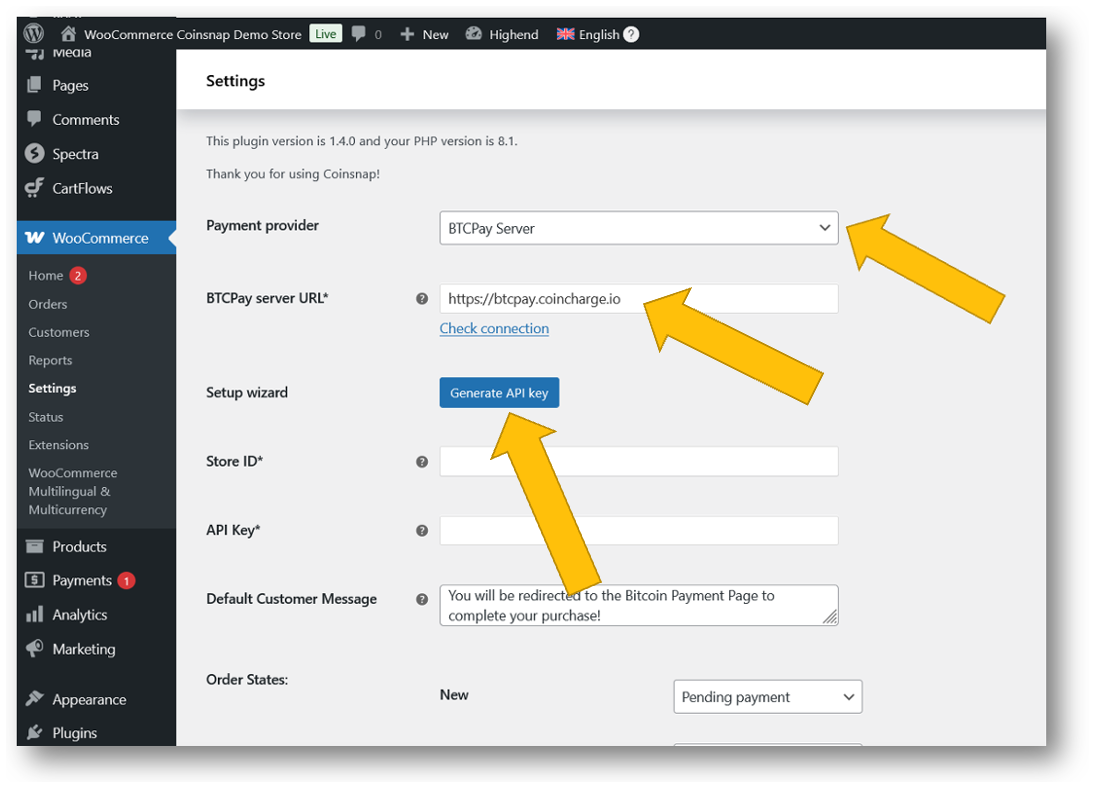
In the Coinsnap plugin settings, select BTCPay Server as the payment provider.
Step 2 – Enter the BTCPay Server URL
Enter the URL of your BTCPay Server instance and start the BTCPay Server connection wizard.
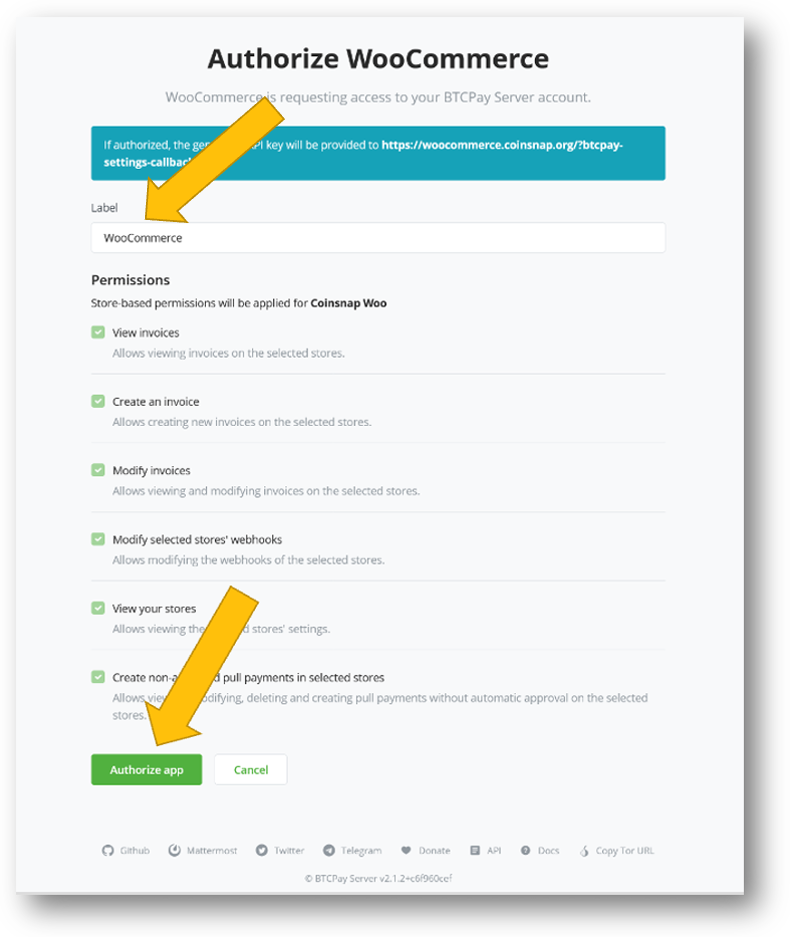
Step 3 – Select and authorize the store
You will be redirected to your BTCPay Server. Select the BTCPay Store that should be connected, review the requested permissions and authorize the integration.
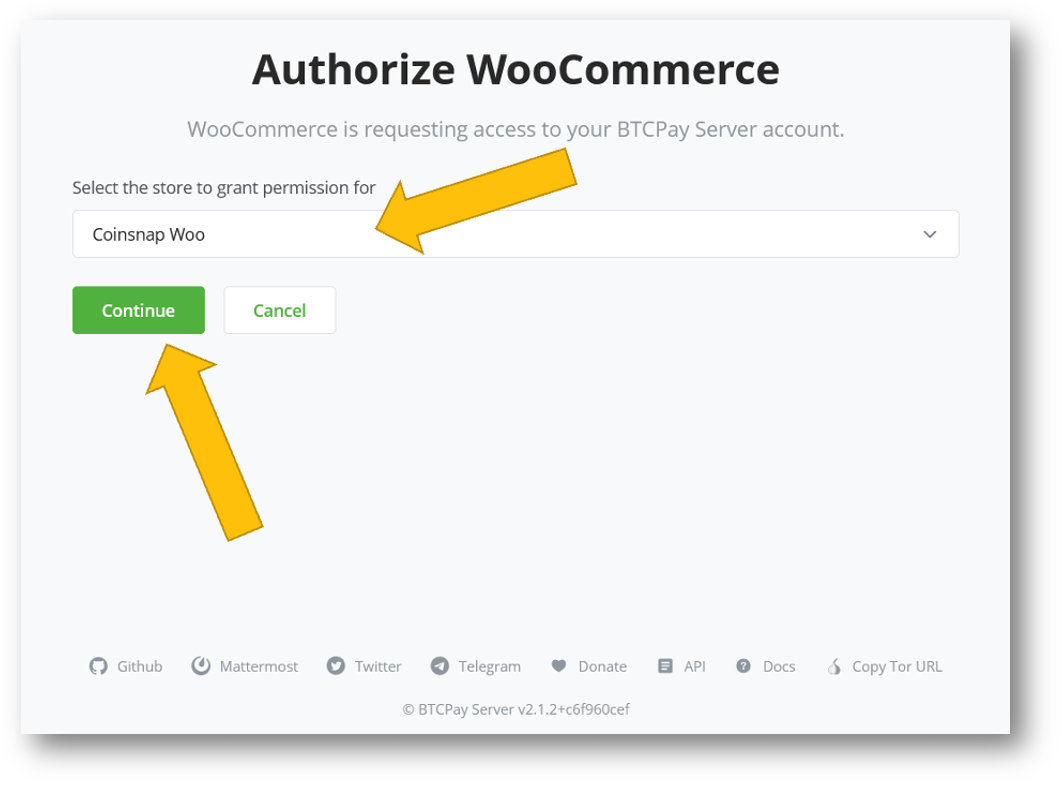
Review the permissions your Coinsnap payment plugin requests and authorize access if they are appropriate for the integration.
Step 4 – Return to the plugin
After authorization, return to the Coinsnap plugin and verify that the BTCPay Server connection has been saved successfully.
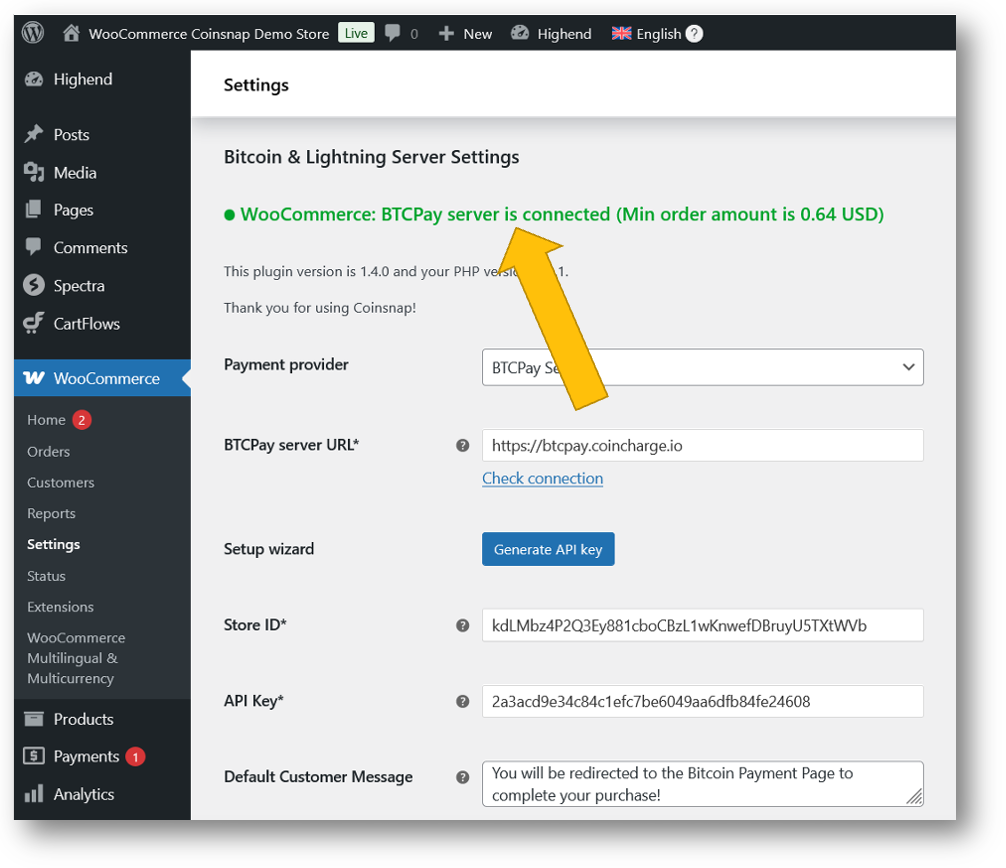
The exact screens can vary depending on the Coinsnap plugin and BTCPay Server version. Always review the permissions requested by the integration before authorizing access.
Coinsnap’s BTCPay Server-Compatible Plugins Are Free to Use
Coinsnap does not charge a transaction fee when a compatible Coinsnap plugin is used with the merchant’s own BTCPay Server. A Coinsnap merchant account is not required for this operating model.
The plugin itself can be provided free of charge and open source.
Merchants remain responsible for any costs associated with operating or hosting their own BTCPay Server.
Where to get the modules:
Coinsnap GitHub Repository
Open-source and ready to use
Download your plugin on GitHub
WordPress Plugin Directory
Search for “Coinsnap” directly in the WordPress admin area to install compatible plugins.
Download your plugin on WordPress
Why Coinsnap Supports BTCPay Server
Coinsnap has great respect for BTCPay Server and the open-source community that develops and maintains it. BTCPay Server has made an important contribution to self-hosted Bitcoin payment infrastructure and has enabled merchants around the world to accept Bitcoin without depending on a traditional payment processor.
Coinsnap benefits from this open-source ecosystem and wants to contribute in return. One way we do this is by making our shop and WordPress integrations available to merchants who choose to operate their own BTCPay Server.
We believe merchants should have a choice.
Those who want maximum infrastructure control can use their own BTCPay Server. Those who value Bitcoin payments but prefer not to deploy, monitor, update and maintain a payment server can use Coinsnap as a managed alternative.
Our goal is not to replace BTCPay Server. Our goal is to make Bitcoin payments easier to integrate, regardless of which operating model a merchant chooses.
BTCPay Server or Coinsnap: Which Option Fits Your Business?
Choose your own BTCPay Server if:
- you want to operate your own payment infrastructure;
- you want maximum technical control;
- you already operate Bitcoin or Lightning infrastructure;
- you have the technical resources to maintain the server;
- you prefer a self-hosted open-source setup.
Choose Coinsnap if:
- you want to accept Bitcoin without operating a payment server;
- you prefer a managed service;
- you want a fast setup with an existing shop or WordPress plugin;
- you prefer Coinsnap to maintain the payment infrastructure;
- you want access to additional Coinsnap merchant functionality.
The payment plugin does not have to determine your infrastructure strategy. With supported Coinsnap integrations, merchants can choose the payment-provider model that fits them best.
Conclusion: One Integration, Two Ways to Accept Bitcoin
Coinsnap payment plugins are designed to make Bitcoin integration easier for online shops, WordPress websites and other merchant applications.
If you operate your own BTCPay Server, supported Coinsnap plugins can connect your website or shop to your own server and let you retain control over your payment infrastructure.
If you prefer not to operate a BTCPay Server yourself, the same merchant use case can be implemented with Coinsnap as the managed payment provider.
We support both approaches. BTCPay Server represents an important part of the open-source Bitcoin payment ecosystem, and Coinsnap aims to complement that ecosystem by providing integrations and an optional managed alternative.
The result is more choice for merchants — and more ways to accept Bitcoin.
Frequently Asked Questions
Do I need a Coinsnap account to use a Coinsnap plugin with my own BTCPay Server?
No. If the plugin supports BTCPay Server and you configure your own BTCPay Server as the payment provider, a Coinsnap merchant account is not required for that payment connection.
Does Coinsnap charge a transaction fee when I use my own BTCPay Server?
No Coinsnap transaction fee applies to payments processed through your own BTCPay Server. You remain responsible for the costs of operating or hosting your BTCPay Server infrastructure.
Can the same Coinsnap plugin work with Coinsnap or BTCPay Server?
Many Coinsnap payment plugins support both options. The merchant selects the payment provider in the plugin configuration. Check the current plugin documentation to confirm the options supported by a specific integration.
Does Coinsnap host my BTCPay Server?
No. When you select your own BTCPay Server, the BTCPay Server instance is operated by you or by the hosting provider you choose. Coinsnap only provides the compatible shop or website integration.
Why would I use Coinsnap instead of running my own BTCPay Server?
Coinsnap is intended for merchants who want Bitcoin payments without operating and maintaining their own payment-server infrastructure.
Coinsnap provides the payment infrastructure as a managed service.
Why does Coinsnap support BTCPay Server if Coinsnap also offers a payment service?
Coinsnap believes merchants should be able to choose between self-hosted and managed Bitcoin payment infrastructure.
We appreciate the work of the BTCPay Server open-source community and make compatible Coinsnap integrations available to merchants who prefer to use their own BTCPay Server.