
Bitcoin Payments in Hotels & Hospitality | Coinsnap Guide 2026

Bitcoin Payments in Hotels & Hospitality | Coinsnap Guide 2026

Hotels and accommodation providers operate in one of the most international, fast-moving, and payment-intensive industries in the world. Guests book from abroad, pay deposits in advance, settle invoices on arrival or departure, and spend across multiple services during their stay—from restaurants and wellness to activities and rentals.

In this environment, payments are not just an operational necessity. They shape the guest experience, influence booking conversion, and directly impact efficiency and margins.

Bitcoin and Lightning payments offer a practical alternative to traditional payment methods. They reduce friction in international transactions, simplify invoicing, and enable fast, direct payments across the entire hotel business.

With Coinsnap, hotels can accept Bitcoin payments online and at the point of sale, directly into their own wallet. There are no intermediaries holding funds, no chargebacks, and no need to change existing systems.

This guide explains where Bitcoin payments fit into the hospitality industry, why they are useful, and how Coinsnap enables them across the full customer journey—from booking to checkout.

Hotels can accept Bitcoin payments across the entire guest journey—from booking and deposits to on-site services and checkout. With Coinsnap, payments are processed instantly via Lightning or on-chain, without chargebacks, intermediaries, or changes to existing systems.

Why the Hospitality Industry Is Ideal for Bitcoin Payments

Few industries combine international reach, operational complexity, and payment diversity quite like hospitality. This makes hotels a natural fit for Bitcoin payments.

International clientele and payment friction

Hotels attract guests from all over the world. That sounds like a pure advantage—but on the payment side, it creates constant friction. Currency conversions, cross-border fees, regional payment restrictions, and card acceptance issues are part of daily operations.

For a guest, paying a hotel abroad can quickly become more complicated than expected. For the hotel, accepting those payments often means higher fees, delays, and occasional failures.

Bitcoin removes much of this friction. Payments are global by default, independent of banking systems, and do not require currency conversion infrastructure. A guest can complete a payment instantly via Lightning, or reliably via an on-chain transaction, without depending on card networks or international transfers.

Upfront payments for reservations

Many hotels require deposits, reservation guarantees, or full prepayments—especially during peak seasons or for high-value bookings. These payments often come from international guests, where sending money abroad may be slow, expensive, or even restricted.

Bitcoin offers a neutral payment rail that works regardless of geography or local banking limitations. A guest can complete a reservation payment within seconds, without needing a credit card or navigating international bank transfers.

Platform-based bookings and off-platform payments

Booking platforms such as Booking.com or Airbnb frequently separate booking from payment. Options like “pay at property” or “pay later” create a natural gap between reservation and settlement.

Hotels can use this gap strategically. A booking can be confirmed through the platform, while the actual payment is handled directly by sending a Bitcoin payment request for a deposit or the full amount.

This approach gives hotels more control over the payment process. It reduces friction, adds flexibility for international guests, and can improve conversion in situations where traditional payment methods fall short.

Invoice-driven workflows

Invoicing sits at the core of hotel operations. Reservation confirmations, deposit requests, final invoices, and B2B billing for events or group bookings all rely on structured payment requests.

Traditional invoice payments tend to be slow and manual. Guests must enter bank details, reference numbers, and wait for confirmation. Errors happen, and reconciliation takes time.

Bitcoin turns an invoice into a direct payment action. Instead of instructions, the guest receives a simple way to pay immediately, without ambiguity or delay.

Multiple revenue streams within the hotel

A hotel is more than a place to sleep. It operates restaurants and bars, spa and wellness services, rentals, excursions, and various personal services.

Each of these touchpoints requires payments that are fast, flexible, and easy to complete. Bitcoin, particularly via Lightning, fits naturally into this environment. It enables small, spontaneous, mobile-first transactions that align with how guests behave during their stay.

Whether paying for a drink, booking a massage, or renting equipment, the experience becomes quick and frictionless.

Checkout and final settlement

At the end of a stay, guests are often presented with a consolidated bill covering multiple services. This can become a point of friction, especially for international travelers dealing with currency conversions, card limits, or unfamiliar payment processes.

Bitcoin simplifies this final step. The invoice becomes a QR code, and the guest completes the payment instantly—either via Lightning for speed or on-chain for larger amounts.

There are no forms to fill out, no delays, and no uncertainty. The transaction is completed directly and finally.

Key Benefits of Bitcoin Payments for Hotels and their Guests

Bitcoin payments are not just an alternative—they solve specific, recurring problems in the hospitality business.

Benefits for hotels

For hotels, the most immediate impact is a reduction in payment friction. International transactions become simpler, and there is no need to deal with complex banking details or failed card payments.

Settlement is faster as well. Payments arrive directly in the hotel’s wallet, either instantly via Lightning or within minutes on-chain. This improves cash flow and reduces dependency on third-party processors.

A particularly important advantage is the absence of chargebacks. Bitcoin and Lightning payments are final. Once a transaction is completed, it cannot be reversed by the payer. For hotels, this removes a significant source of risk and administrative overhead. There are no post-checkout disputes, no fraud-related reversals, and no need to manage chargeback processes. This is especially relevant for high-value bookings, international reservations, and no-show scenarios.

Costs are typically lower compared to traditional payment methods, particularly for cross-border transactions. At the same time, Bitcoin can be added as an additional payment option without replacing existing systems. Hotels can integrate it alongside cards and bank transfers without disrupting their current setup.

Finally, offering Bitcoin payments can attract new customer segments. International travelers, tech-savvy guests, and customers actively looking for crypto-friendly businesses may prefer or even expect this option.

Benefits for guests

For guests, the experience becomes simpler and more predictable. Payments can be made from anywhere without worrying about currency conversion, bank restrictions, or card compatibility.

The process itself is faster. A QR code scan replaces the need to enter payment details or wait for confirmations. This reduces friction at every stage, from booking to checkout.

Privacy is another factor. Guests can complete payments without sharing sensitive financial information, which is increasingly important for many travelers.

At the same time, Bitcoin payments in hotels offer flexibility. Guests can choose between Lightning for fast, everyday payments or on-chain transactions for larger amounts, depending on their preference.

Bitcoin Payments Across the Hotel Customer Journey

Bitcoin payments are not limited to a single interaction. They can be integrated across the entire lifecycle of a guest’s stay.
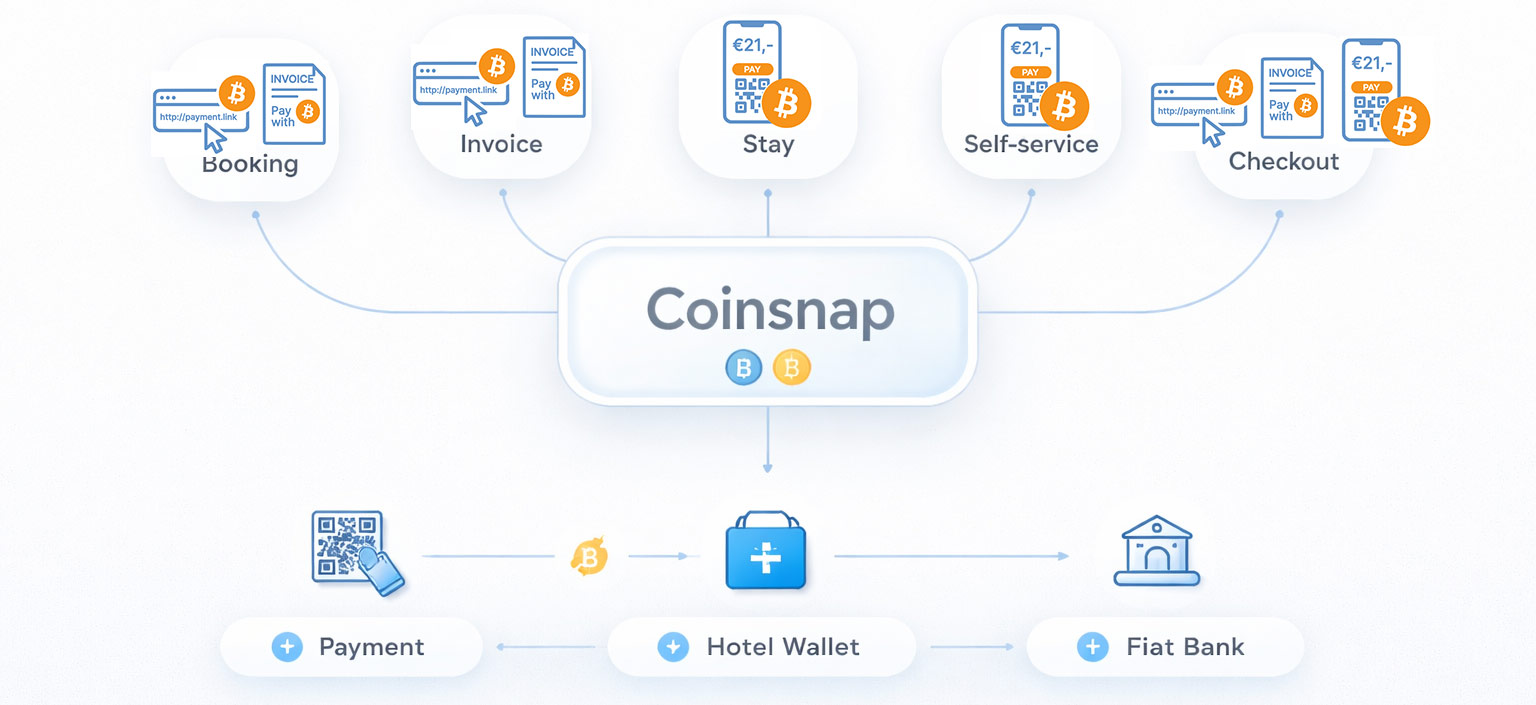
How Bitcoin payments in hotels work with Coinsnap


Booking and reservation payments

At the booking stage, hotels can request deposits or full prepayments by sending a payment link or invoice. This works both for direct bookings and for reservations made through platforms where payment is not processed immediately.

For international guests or last-minute bookings, this can significantly reduce friction and speed up confirmation.

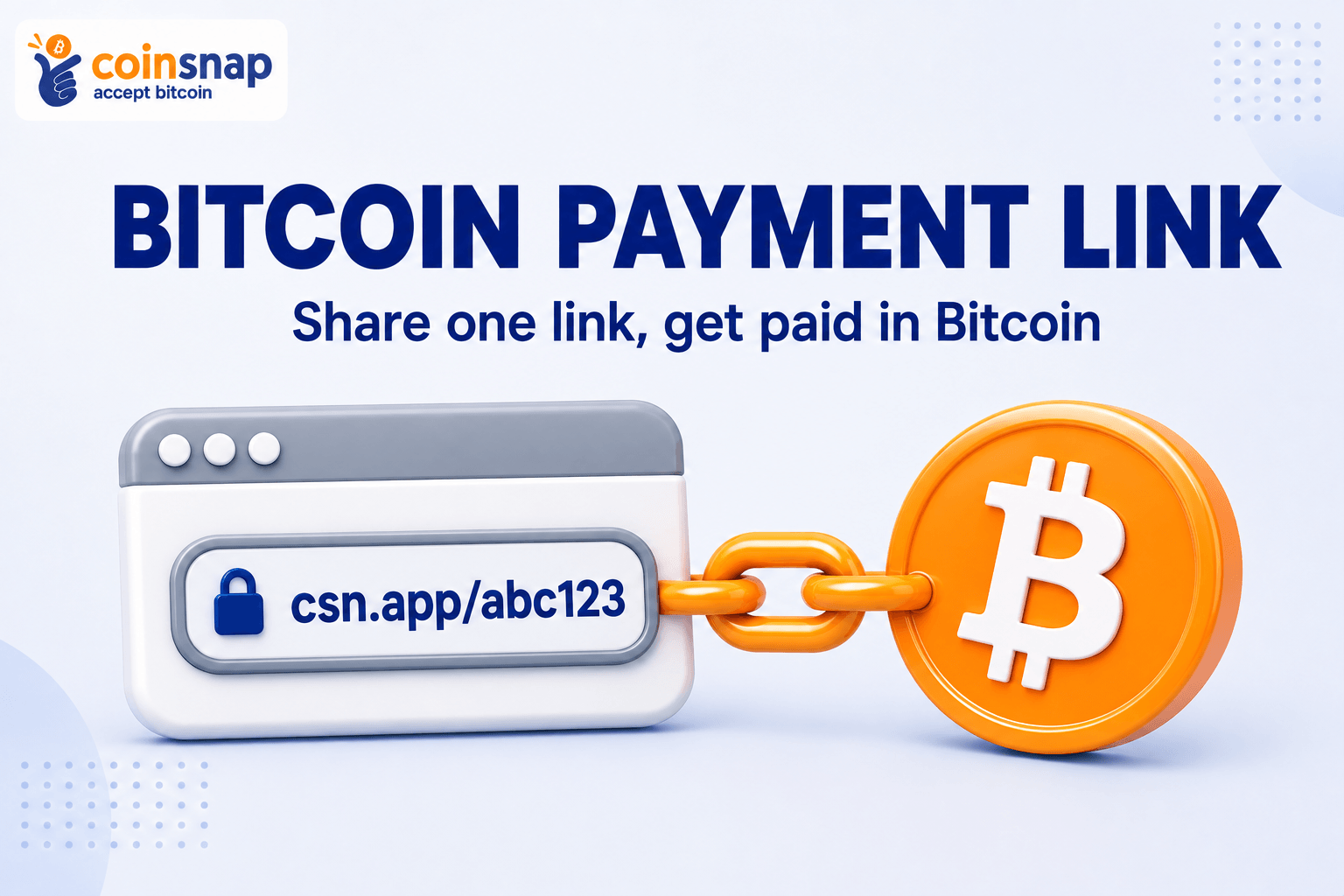
Bitcoin Payment Link
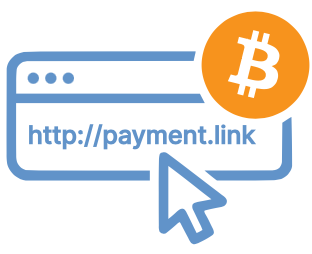
Coinsnap Payment Link for Bitcoin payments in hotelsThe Bitcoin Payment Link is the simplest way to accept Bitcoin payments without relying on a shop system, payment gateway, or dedicated website. It is designed for situations where a hotel—or any business—already communicates payment requests directly, for example via email, messaging, or booking communication.

Instead of providing bank details or payment instructions, the hotel includes a payment link. When the guest opens it, they are taken to a Coinsnap-hosted payment page, where they click “Pay with Bitcoin” and complete the payment by scanning a QR code with their wallet.

The Payment Link does not replace invoicing or booking systems. It works alongside them. This makes it particularly useful for reservation deposits, prepayments, and B2B bookings, where invoices are created and sent through existing workflows, but payment itself should be faster and simpler.

Because the payment page is fully browser-based, it works on any device and requires no installation. Payments are processed instantly and forwarded directly to the hotel’s wallet, a connected BTCPay Server, or—if preferred—converted into fiat via Coinsnap partners.

👉 Learn more about the Bitcoin Payment Link and start accepting Bitcoin payments without changing your existing processes.

Bitcoin Invoice

Coinsnap Bitcoin Invoice for Bitcoin payments in hotelsThe Bitcoin Invoice pay-tool is designed to let customers settle invoices that have already been issued—without changing how those invoices are created or sent. It does not generate invoices itself. Instead, it provides a dedicated Bitcoin payment form that customers can use to pay an existing invoice.

The process is straightforward. The hotel sends its invoice as usual—via email, booking system, or accounting software—and includes a link to a Bitcoin payment page or embedded form. The guest opens this page, enters the invoice amount and reference, clicks “Pay with Bitcoin,” and completes the payment by scanning a QR code with their wallet.

This makes the Bitcoin Invoice particularly useful for hotels that rely on external invoicing systems or custom workflows. It fits seamlessly into existing processes while adding a global, low-friction payment option—without relying on card networks or bank transfers.

Payments are sent directly to the hotel’s configured destination, whether that is a Lightning wallet, an on-chain wallet, a connected BTCPay Server, or—if preferred—converted into fiat via Coinsnap partners.

👉 Explore the Bitcoin Invoice pay-tool and enable simple, borderless invoice payments with Bitcoin.

B2B bookings and group arrangements

Hotels regularly handle corporate bookings, conferences, and group stays. These arrangements often involve large upfront payments, international clients, and complex invoicing structures.

Bitcoin payments in hotels simplify thes processes by enabling fast, direct payments that are not dependent on banking timelines or regional restrictions.

In these scenarios, both Payment Links and Bitcoin Invoices provide efficient ways to handle large transactions while keeping the process simple for the client.

Payments during the stay

During the stay, guests interact with multiple services. Payments for food, drinks, wellness, or activities can be handled quickly through a simple point-of sale interface.

Web Point of Sale (WebPoS)
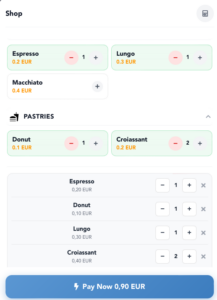
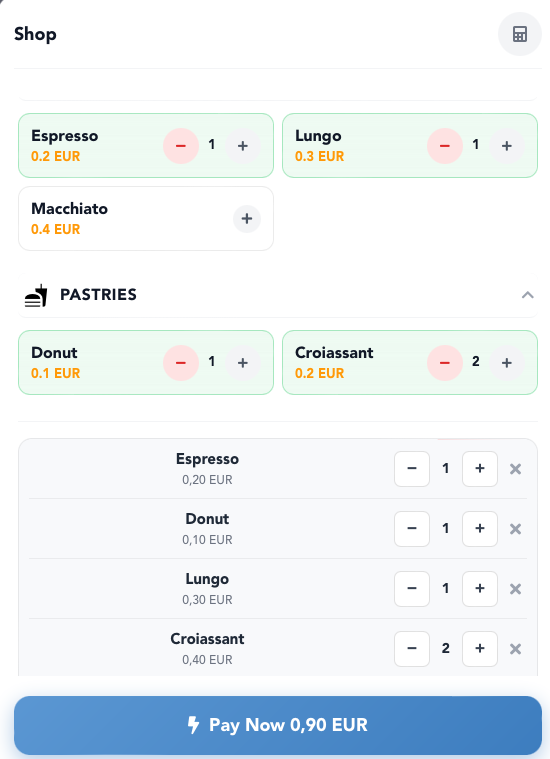
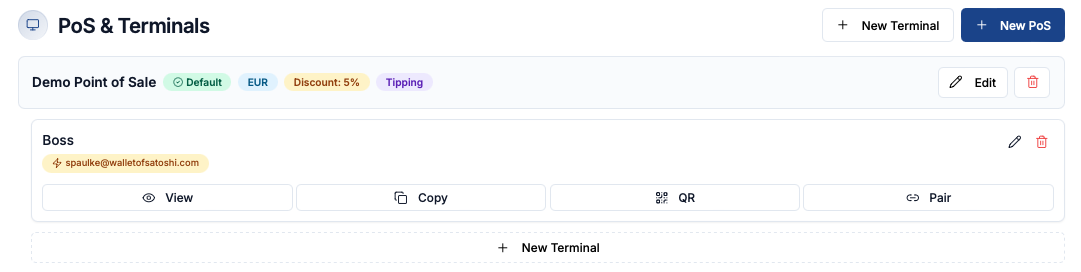
Coinsnap WebPoS for Bitcoin payments in hotelsThe Web Point of Sale is designed for in-person payments, allowing hotels to accept Bitcoin and Lightning anywhere on-site—at the front desk, in the restaurant, at the bar, in the spa, or at temporary service points. It runs entirely in the browser, so any smartphone, tablet, or computer can be used without installing apps or specialized hardware.

Staff can either select items from a simple product catalog or enter amounts manually, making it suitable for both structured sales and flexible scenarios such as services, tips, or ad-hoc charges. The interface is intuitive and built for everyday use, enabling team members to accept payments quickly and reliably, even in busy environments.

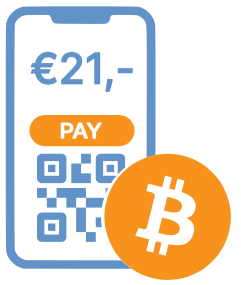
At the same time, the WebPoS is highly versatile. It can also be used in self-service settings—such as minibar stations, rental areas, or unattended service points—where guests complete payments independently by scanning a QR code.

All payments are processed instantly and sent directly to the hotel’s configured wallet or settlement destination, while operational control remains with the business, even when multiple staff members use the system.

👉 See how the WebPoS enables flexible, staff-friendly, and self-service Bitcoin payments across your hotel.

Self-service payments

Self-service areas are increasingly common in hotels. Whether it is a minibar, a rental station, or a shared facility, guests expect to be able to pay independently.

The WebPoS can be placed directly at these touchpoints, allowing guests to select an item and complete the payment instantly using their smartphone—without staff involvement.

This reduces operational overhead while improving convenience.

Checkout and final invoice

At checkout, Bitcoin turns the final invoice into a direct payment interaction. Instead of processing a card or waiting for a transfer, the guest scans a QR code and completes the transaction immediately.

Both the Bitcoin Invoice and the WebPoS can be used here, depending on how the hotel structures its checkout process.

Coinsnap Solutions for Every Hotel Payment Scenario

Coinsnap covers every Bitcoin payment use case in the hospitality business. Whether it’s reservation payments, invoicing, in-person transactions, or self-service payments, each scenario is supported by a dedicated solution that integrates seamlessly into existing hotel workflows.

If a specific edge case requires a custom setup, Coinsnap’s open architecture—with APIs, open-source components, and detailed documentation—ensures it can still be implemented with acceptable effort.

Bitcoin Payment Integration (API & Plugins)

For hotels that want to fully integrate Bitcoin payments into their existing systems, Coinsnap offers a flexible integration layer based on APIs, plugins, and open-source components. This allows payment functionality to be embedded directly into hotel management software or custom invoicing systems.

Instead of adding payments externally, Bitcoin becomes part of the native workflow—from booking confirmation to automated invoicing and checkout. This is particularly valuable for hotels with established digital infrastructure or specific operational requirements.

Thanks to detailed documentation and a modular architecture, integration can be implemented efficiently and adapted to individual needs.

👉 Discover how Coinsnap integration brings Bitcoin payments directly into your hotel systems.

Coinsnap Dashboard
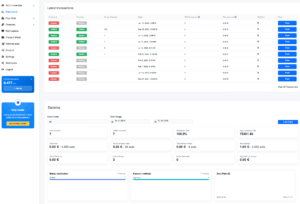
Coinsnap Dashboard: make Bitcoin payments in Hotels transparent!The Coinsnap Dashboard gives hotel management full visibility over all Bitcoin payments in real time. Every transaction—whether from booking deposits, invoices, point-of-sale payments, or self-service—is clearly recorded and accessible in one central interface.

For each payment, all relevant details are available, including timestamps, amounts in Bitcoin and fiat equivalents, transaction status, and references that can be linked to bookings or invoices. This makes it easy to track revenue across different areas of the hotel and maintain a clear overview at all times.

For accounting and tax purposes, transaction data can be exported in structured formats, allowing seamless integration into existing bookkeeping and reporting workflows such as PayinBTC.me or Cointracking. This ensures that Bitcoin payments fit cleanly into standard financial processes without additional complexity.

👉 Explore the Coinsnap Dashboard and keep full control over your Bitcoin payment operations

Which Coinsnap Solution Fits Which Use Case?

Different scenarios require different tools, but they all fit into a coherent system.

For hotels using their own booking software, API integration allows payments to be embedded directly into the booking and invoicing flow. This creates a seamless experience from reservation to payment.

For platform-based bookings where payment happens outside the platform, Payment Links and Bitcoin Invoices provide a simple way to request deposits or full payments. If the guest pays on arrival, the WebPoS offers a flexible option at the front desk.

In B2B scenarios, Payment Links and Invoices are particularly effective, as they simplify large, cross-border transactions and reduce administrative complexity.

For daily operations such as restaurants, wellness services, rentals, or personal services, the Web-PoS is the most practical tool. It enables fast, direct payments and fits naturally into staff workflows.

In self-service environments, the same Web-PoS interface can be used without staff involvement, allowing guests to pay independently.

At checkout, all options come together. The final invoice can be settled via a link, an invoice page, or directly at the point of sale, depending on the setup.

Common Concerns About Bitcoin Payments in Hotels

While Bitcoin payments offer clear advantages, hotels often have practical concerns.

Volatility is one of the most common. However, hotels do not need to hold Bitcoin. Payments can be converted into fiat currency through integrated partners like Wave.space, Bringin or DFX, allowing businesses to receive euros or other currencies directly.

Accounting is another consideration. Coinsnap provides transaction data that can be exported and integrated into existing accounting workflows, ensuring proper documentation and compliance.

Complexity is often overestimated. There is no need to run nodes, manage infrastructure, or develop custom systems. Setup is straightforward and can be completed quickly.

From the guest perspective, usability is simple. Paying with Bitcoin is reduced to scanning a QR code. No technical knowledge is required.

Conclusion – Why Your Hotel Is Ready for Bitcoin Payments

Hotels operate in a demanding payment environment shaped by international guests, multiple revenue streams, and diverse transaction scenarios.

Bitcoin payments in hotels offer a practical way to reduce friction, improve efficiency, and simplify operations across the hotel business while attracting a new generation of crypto-savvy guests.

They enable faster international payments, streamlined invoicing, seamless point-of-sale transactions, and reliable, final settlements without chargeback risk.

With Coinsnap, hotels can integrate these capabilities into their existing systems without disruption, avoiding the need for expensive consultants and leaving core business IT and operations untouched.

For accommodation providers looking to modernize their payment infrastructure and improve the guest experience, Bitcoin is not an experiment. It is a working solution that fits naturally into the way hotels already operate.

FAQ

Why should hotels accept Bitcoin payments?

Bitcoin payments reduce friction in international transactions, lower fees, and eliminate chargebacks while improving the guest payment experience.

Can Bitcoin be used for hotel bookings?

Yes. Hotels can request deposits or full payments using Bitcoin Payment Links or Bitcoin Invoices, even for bookings made via platforms.

How do hotels accept Bitcoin at the front desk?

Hotels can use a Web Point of Sale where staff enter the amount and guests pay by scanning a QR code.

What is the best Bitcoin payment solution for hotels?

A flexible solution like Coinsnap is ideal, as it covers booking, invoicing, point-of-sale, and checkout scenarios.

Do Bitcoin payments work for small transactions in hotels?

Yes. Lightning payments are optimized for fast, low-cost transactions, making them ideal for restaurants, bars, and services.

How are Bitcoin payments handled in hotel accounting?

Transaction data can be exported and integrated into standard accounting systems, including fiat values and timestamps.

How to integrate Coinsnap Pay Links into a custom eCommerce application

Overview

The Coinsnap Pay Link API allows merchants to add Bitcoin payments to their own eCommerce application, even if a direct Bitcoin integration into the normal checkout is not possible or not practical.

Instead of integrating Bitcoin as a live payment method directly into the shop checkout, the merchant creates a unique Pay Link for each order or invoice. This link contains all relevant payment details in advance, such as the order ID or invoice number, amount, currency, and optional customer information.

The Pay Link can then be shown to the customer after checkout, included in an order confirmation email, attached to an invoice PDF, or displayed in a customer account area.

When the customer opens the Pay Link, Coinsnap shows a hosted payment page with the order details already prefilled. If the customer chooses to proceed with Bitcoin payment, Coinsnap generates a fresh Bitcoin payment invoice using the current exchange rate. The customer can then pay via Bitcoin or Lightning.

This approach is especially useful for:

  • custom eCommerce applications without a standard Coinsnap plugin
  • shop systems where direct checkout integration would be too complex
  • invoice-based payment flows
  • marketplaces, B2B ordering systems, and service platforms
  • situations where Bitcoin should be offered as an additional payment option next to bank transfer

How the payment flow works

Before starting the technical integration, it is important to understand the difference between the Pay Link and the Bitcoin payment invoice.

A Pay Link is the merchant-facing payment request for one specific order or invoice.

A Bitcoin payment invoice is the technical payment request that Coinsnap generates only when the customer actually starts the Bitcoin payment process.

This means:

  1. Your eCommerce system creates one Pay Link for one order.
  2. The customer opens the Pay Link.
  3. Coinsnap displays the hosted payment page.
  4. The customer clicks to pay with Bitcoin.
  5. Coinsnap creates a Bitcoin payment invoice based on the current exchange rate.
  6. The customer pays the invoice.
  7. If the invoice expires unpaid, the same Pay Link can be opened again later to generate a new Bitcoin payment invoice for the same order.

So the Pay Link remains tied to the same order, while the actual Bitcoin invoice may be recreated if a previous payment attempt expired.

Step 1: Decide where the Pay Link should be used in your eCommerce flow

The first step is to decide at which point in your application the Pay Link should be created and shown to the customer.

Typical options are:

Option A: After order confirmation

The customer places the order first. After the order is created, your system generates a Coinsnap Pay Link and shows it on the confirmation page.

This is useful when Bitcoin is offered as an alternative payment method after checkout.

Option B: In the order confirmation email

Your system generates the Pay Link after the order is created and includes it in the email sent to the customer.

This is useful when the customer may want to pay later.

Option C: In the customer account area

The order is created as unpaid in your system. The customer can later log in and click “Pay with Bitcoin” from the order overview.

Option D: Attached to an invoice

If your business sends invoices, the Pay Link can be added to the invoice email or PDF, similar to how bank transfer instructions are normally shown.

For many merchants, this is the easiest way to understand the purpose of the Pay Link:

Instead of printing IBAN, bank name, payment reference, and amount on the invoice, you provide a Bitcoin payment link that already includes all payment data.

Step 2: Create the order in your own eCommerce system first

Before you call the Coinsnap API, your own system should already create the order or invoice internally.

This is important because the Pay Link should always belong to a specific business transaction.

At minimum, you should already have:

  • your own internal order ID or invoice number
  • the order amount
  • the currency
  • optionally the customer name or email
  • optionally a description for the payment
  • optionally a success URL where the customer should return after payment

Example:

  • Order ID: ORD-2026-1045
  • Customer: John Smith
  • Amount: 149.00
  • Currency: EUR

This order ID becomes the key reference between your eCommerce system and Coinsnap.

Step 3: Create a Pay Link via the Coinsnap API

Once the order exists in your own system, your application sends a request to Coinsnap to create a Pay Link.

Endpoint:

POST /api/v1/stores/{storeId}/payment-requests

The request should contain the core payment data for that order.

Typical fields include:

  • amount
  • title
  • currency
  • orderId
  • description
  • redirectUrl
  • customerEmail
  • discount
  • internalNote
  • expiryDate

Example request:

{
"amount": 149.00,
"title": "John Smith",
"currency": "EUR",
"orderId": "ORD-2026-1045",
"description": "Order ORD-2026-1045",
"redirectUrl": "https://yourshop.com/payment-success",
"customerEmail": "john@example.com",
"discount": 5,
"internalNote": "Custom webshop order"
}

What these fields mean

amount The fiat amount the customer should pay.

title A customer-facing label, usually the customer name, company name, or order label.

currency The currency of the original order, for example EUR or USD.

orderId Your own reference, such as the order number or invoice number.

description A short human-readable explanation shown to the customer.

redirectUrl The URL where the customer should be sent after successful payment.

customerEmail An optional pre-filled customer email address.

discount Optional Bitcoin discount, if you want to reward Bitcoin payments.

internalNote Optional note visible only to the merchant.

Step 4: Store the returned Pay Link in your own system

When Coinsnap successfully creates the Pay Link, the API returns a response like this:

{
"id": "3JUseUusmduemKeJkv3H",
"url": "https://pay-link.coinsnap.io/payment-requests/3JUseUusmduemKeJkv3H?type=individual"
}

You should store both values in your own database:

  • the Coinsnap Pay Link ID
  • the Pay Link URL

You should also store them together with your own order record.

Step 5: Show the Pay Link to the customer

After the Pay Link has been created, your application can present it in different ways.

On a confirmation page

Pay this order with Bitcoin

In an email

Click here to pay your invoice with Bitcoin

In a PDF invoice

You can insert the link as clickable text or as a QR code.

In the customer account

You can display the payment button only while the order is still unpaid.

Step 6: What the customer experiences

When the customer opens the Pay Link, they do not immediately see a Bitcoin QR code.

Instead, they first see a hosted Coinsnap payment page with the prefilled order details.

  • who the payment is for
  • what amount is due
  • which currency applies
  • which order or invoice the payment belongs to

When the customer clicks Pay with Bitcoin, Coinsnap then creates the actual Bitcoin payment invoice.

  • the fiat amount is converted into Bitcoin
  • the current exchange rate is applied
  • the customer receives the QR code and payment details
  • the Bitcoin invoice is valid only for a limited time

If the customer pays within the validity period, the order can be marked as paid.

If the customer does not pay in time, the Bitcoin invoice expires. The customer can later reopen the same Pay Link and start again.

Step 7: Check the status of the Pay Link

GET /api/v1/stores/{storeId}/payment-requests/{id}
GET /api/v1/stores/{storeId}/payment-requests

Step 8: Mark the order correctly in your own eCommerce system

  • Order created → status: pending payment
  • Pay Link created → status: awaiting bitcoin payment
  • Bitcoin payment completed → status: paid
  • Order fulfilled → status: completed

Step 9: Use Pay Links where checkout integration is not possible

  • custom-built order systems
  • older enterprise software
  • ERP-driven ordering portals
  • B2B systems with invoice-based payment
  • special workflows where the total is confirmed manually before payment

Step 10: Recommended implementation logic

  • One Pay Link per order or invoice
  • Always store your own reference ID
  • Keep your own order system as the master
  • Treat the Pay Link as customer-facing
  • Treat the Bitcoin invoice as technical
  • Keep the payment process simple

Example end-to-end flow

  1. Customer places an order in your eCommerce application.
  2. Your system creates order ORD-2026-1045.
  3. Your application calls the Coinsnap Pay Link API.
  4. Coinsnap returns a unique Pay Link.
  5. Your system stores the Pay Link and attaches it to the order.
  6. The customer receives the order confirmation email with the Bitcoin payment link.
  7. The customer opens the link.
  8. Coinsnap shows the hosted payment page with order details.
  9. The customer clicks to pay with Bitcoin.
  10. Coinsnap creates a fresh Bitcoin payment invoice using the current exchange rate.
  11. The customer pays.
  12. Your application updates the order to paid.

Why this is useful for non-technical merchants

A non-technical merchant can think of the Coinsnap Pay Link like this:

It is similar to adding a payment button to an invoice.

Instead of telling the customer:

  • please transfer EUR 149.00
  • to this bank account
  • with this payment reference

the merchant simply sends:

  • here is your Bitcoin payment link

The customer clicks the link and pays with Bitcoin.

All important payment details are already included.

This reduces friction, avoids input mistakes, and makes Bitcoin usable even in business workflows that were originally designed for bank transfers.

Summary

The Coinsnap Pay Link API is a practical way to add Bitcoin payments to a custom eCommerce application without requiring a full checkout integration.

The merchant creates one unique Pay Link for each order or invoice. The customer opens that link and starts the payment. Coinsnap then creates the actual Bitcoin payment invoice using the current exchange rate.

This makes Pay Links ideal for:

  • custom eCommerce systems
  • invoice-based payment flows
  • order confirmation emails
  • customer account payment pages
  • accounting and ERP-driven payment requests

In short:

Your eCommerce system manages the order.

Coinsnap manages the Bitcoin payment flow.

The Pay Link connects both.

Paying Invoices with Bitcoin

Paying Invoices with Bitcoin

How your customers can easily pay their invoices in Bitcoin

Do you send invoices to your customers that have previously been paid by bank transfer, but now want to accept Bitcoin payments? With Coinsnap, your customers can pay their invoices using Bitcoin. There are two simple ways to do this:

  • Bitcoin Payment Link
  • Bitcoin Invoice Form

Both methods allow your customers to pay your invoices directly in Bitcoin. The main difference lies in how the payment process is initiated — and in the effort required on your side as the merchant.

With a Bitcoin Payment Link, your customer receives an individual payment URL, for example: 👉

https://pay-in-bitco.in/QZJIWg

When the customer clicks the link, a payment page opens showing a “Pay Invoice” button.

At the moment of payment, the Euro amount is automatically converted into Bitcoin based on the current exchange rate, and a QR code is displayed for the customer to scan with their Bitcoin wallet.

As the merchant, you generate the link directly in the Coinsnap backend under:
Menu → Pay Tools → Pay Link

You simply enter the invoice number, amount, and description. The system then generates a unique payment link that you can send to your customer.

In an upcoming update, you’ll also be able to upload a CSV file containing multiple invoices. Coinsnap will automatically generate the corresponding payment links — ideal for merchants who issue many invoices at once.

Advantages and disadvantages

Advantages:

  • Very convenient for the payer
  • Each payment is clearly linked to a specific invoice
  • Reduces errors or mismatched payments

Disadvantages:

  • More setup effort for the merchant (one link per invoice)
  • Less suitable for mass invoicing

Further Information: Coinsnap Payment Link

Bitcoin Invoice Form

With the Bitcoin Invoice Form, you provide a fixed link on your own website, for example: 👉
https://my-company.com/bitcoin

Your customer visits this page and enters the invoice details (invoice number, amount, name, etc.) — just like filling out an online banking form.

After completing the fields, they click “Pay the invoice with Bitcoin”, and the payment process begins automatically.

Benefits for merchants

The biggest advantage: you don’t need to create an individual link for each invoice.
You can simply print the URL of your Bitcoin invoice form directly on every invoice — next to your usual bank details.
That way, every customer has the option to pay you in Bitcoin at any time.

Technical implementation

The Bitcoin Invoice Form is available in two versions:

  • As a WordPress plugin – Coinsnap Bitcoin Invoice Form, compatible with both Coinsnap and BTCPay Server
  • As HTML code – easily embedded into any type of website

In the Coinsnap backend, go to:
Menu → Pay Tools → Invoice Form

There, you can customize the field names and generate the HTML code to embed on your site.

Once added, your customers can pay invoices directly in Bitcoin — quickly and conveniently.

Advantages and disadvantages

Advantages:

  • No need to create separate links
  • Works for all customers automatically
  • Easy to integrate into existing invoicing processes

Disadvantages:

  • Customer must enter their own data (potential for input errors)
  • Less automatic payment assignment if data is incorrect

Further Information:


Recommendation

  • If you occasionally receive Bitcoin payments and want to send a personalized payment link when a customer requests it, the Bitcoin Payment Link is the best option.
  • If you want to offer Bitcoin as a standard payment option to all your customers without extra effort, choose the Bitcoin Invoice Form.

Both methods are excellent ways to give your customers — who previously paid via traditional bank transfer — a modern, transparent, and seamless way to pay invoices in Bitcoin.

Bitcoin Invoice Form: How to get bills paid with Bitcoin (on-chain & Lightning)

Paying bills with Bitcoin – why it matters now

Imagine you’re a tradesman and you’ve just completed a project. Your customer is satisfied, and you send them the invoice. Normally, you’d expect a traditional bank transfer. But this customer asks, “Can I pay the invoice with Bitcoin?”

Or maybe you run a small online shop. Your customers can currently only pay by bank transfer because integrating other payment methods is complicated. But the question is increasingly coming up: “Does this also work with Bitcoin?”

Coinsnap’s Bitcoin invoice form enables you to do just that: have invoices paid with Bitcoin directly on your website – simple, reliable, and without any media disruption.

Bills as usual – plus Bitcoin option

You issue your invoice as usual (services, IBAN, payment term). Additionally, you offer “Pay bill with Bitcoin” – e.g. at: yourdomain.com/bitcoin. There, your customers will find a form that’s just as intuitive to use as a classic online transfer form:

  • Invoice amount and currency (e.g. Euro)
  • Invoice number for unique assignment
  • Optional name and message

After clicking on “Pay invoice with Bitcoin”, a QR code will be displayed that can be paid with Bitcoin on-chain or with Lightning.

Practical examples – where the Bitcoin invoice form makes sense

The Bitcoin invoice form is suitable not only for traditional service providers, but for a wide range of industries.

Online shops

Not every online store can easily integrate Bitcoin payments. The invoice form offers a simple solution: You continue to offer payment on account – the customer can then freely choose whether to pay the invoice by bank transfer or directly with Bitcoin.

Contractors & service providers

Whether it’s a painter, electrician, or IT consultant, many service providers issue invoices for their services – either as an advance payment or after the job is completed. With the Bitcoin invoice form, your customers can now also pay these invoices with Bitcoin, without you having to change your existing accounting system.

Hotels & Restaurants

Invoicing is also common in the hotel and restaurant industry – whether as a deposit or a final invoice for overnight stays, events, or catering. With the additional Bitcoin option, guests can pay their bill directly in Bitcoin, giving them the peace of mind of using a modern payment method.

Goods seller

Whether you’re a wholesaler, a small shop, or a sole proprietor, the form can be used anywhere that sells goods and issues invoices. Merchants who already work with international customers in particular benefit from the fact that Bitcoin payments are fast, inexpensive, and borderless.

Fair Bitcoin conversion at the time of payment

A major advantage of the Bitcoin invoice form is the dynamic conversion: the euro amount is only converted into Bitcoin at the time of payment – not when the invoice is created.

This means for you and your customers:

  • Regardless of when payment is made within the payment period, the Bitcoin amount is always current.
  • Volatility plays no role in settlement.

The payment will be credited instantly to your Lightning wallet. If you wish, you can automatically convert the amount into euros and have it paid out to your bank account. (see below)

  • Install plugin
  • Connect either to your Coinsnap account or directly to your own BTCPay server
  • Customize the form to your requirements
  • Insert anywhere using a shortcode

Easy integration of the Bitcoin invoice form (HTML & WordPress)

1. HTML version (for each website type)

  • Login to the Coinsnap dashboard
  • Under Payment Tools → Invoice Form configure
  • Generate HTML code
  • Insert on your own website

This is how easy it is to integrate a Bitcoin payment option into any kind of website.

2. WordPress plugin

If you run your site with WordPress, the Coinsnap Bitcoin Invoice Form plugin is available for you.

  • Install plugin
  • Connect either to your Coinsnap account or directly to your own BTCPay server
  • Customize the form to your requirements
  • Insert anywhere using a shortcode

Particularly important: The form is displayed directly on your website. Your customers are not redirected to external sites – a crucial factor for trust and credibility.

Extra feature: Discount when paying invoices via Bitcoin – more conversion, fewer fees

An exciting additional feature is the Bitcoin discount function. If you want to encourage your customers to pay with Bitcoin, you can, for example, offer a 5% discount.

The form automatically calculates the reduced amount and displays it to the payer. This creates a real incentive for payments in Bitcoin!

Optional: Receive Bitcoin payments in euros – this keeps your accounting clean

If you want to accept payments in Bitcoin but do not want to keep Bitcoin in your accounting, you can automatically convert incoming Bitcoin invoice amounts directly into euros (e.g. with Coinsnap + Bringin or DFX) and credit them to your company account.

Further information: Coinsnap + Bringin

FAQ

Does Coinsnap accept bill payments via Bitcoin?

Yes. With Coinsnap Bitcoin invoice form invoices can be On-chain and via Lightning pay directly on your website.

Does the Bitcoin invoice form also work in WordPress?

Yes. Coinsnap Invoice Form Plugin creates a shortcode you can place anywhere on your WordPress website.

How is the Bitcoin amount calculated?

The EUR amount is converted in Bitcoin at the time of payment (rate lock).

Can I receive EUR payouts?

Yes, e.g. with Bringin (immediately in EUR/IBAN) or DFX (periodic).

Conclusion

With Coinsnap’s Bitcoin invoice form, you can accept invoice payments via Bitcoin professionally, transparently, and directly on your website.

  • HTML version: universally applicable, Coinsnap account required
  • WordPress plugin: usable with Coinsnap or your own BTCPay Server
  • Practical relevance: from online shops to craftsmen to hotels and retailers – wherever invoices are written, Bitcoin can now be accepted as a payment method.

Combined with the Bitcoin discount feature, this creates an attractive offer that not only builds trust but can also actively motivate customers to pay in Bitcoin.

Try the Coinsnap Bitcoin invoice form yourself here.

What is a Bitcoin Payment Button?

Offer Bitcoin payment anywhere with the Coinsnap Bitcoin Payment Button

Sell products, merchandise, or services easily for Bitcoin, anywhere on your WordPress website

What is a Bitcoin Payment Button?

Bitcoin Payment ButtonThe payment button allows you to sell individual products and services on your website.
You create a description of the product you want to sell on your website.

You add the Coinsnap payment button to this product description.

When the payer clicks on the payment button, the QR code is displayed and they can pay with Bitcoin Lightning.

So that you as the payee also know who the payment is from, the payer can enter their email address. You can then send a message or a digital product to this email address.

There is also a message field. Here the payer can enter a message or other information relevant to the purchase.

The payment button is great for websites that want to sell individual products or services and for which a shop software solution is somewhat oversized.

How can I create a payment button?

c


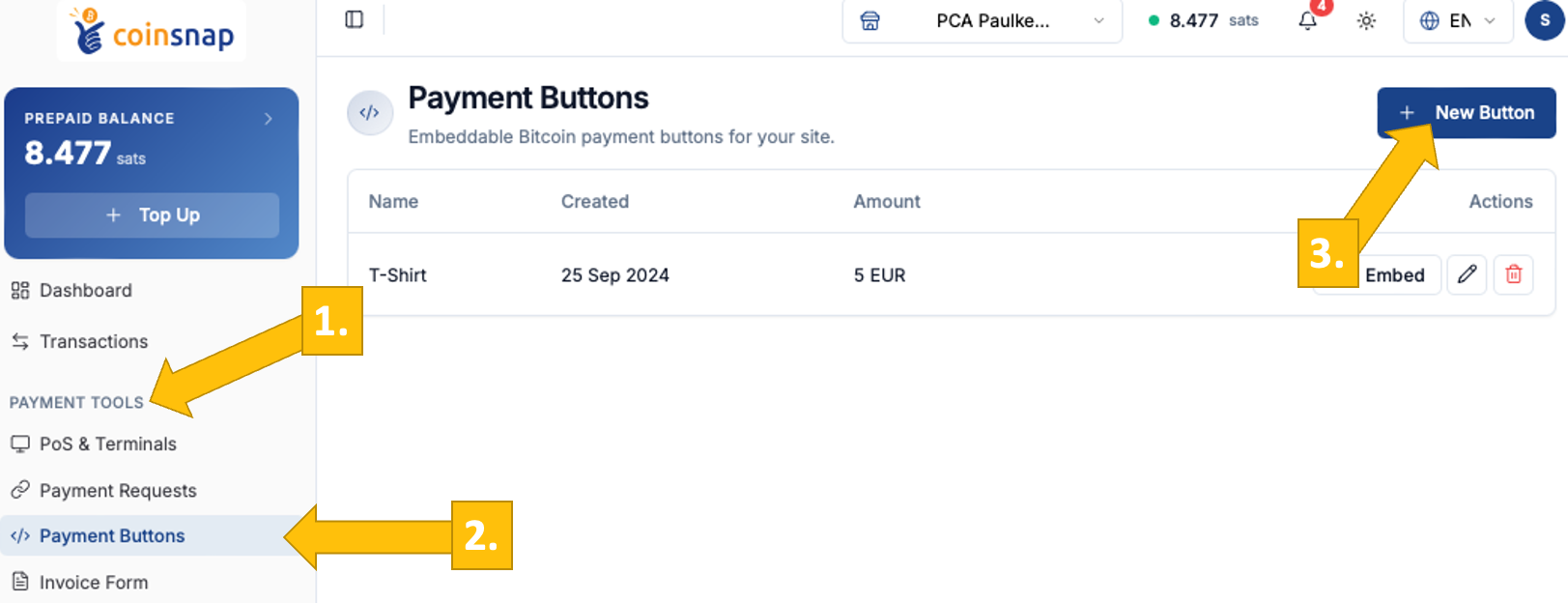
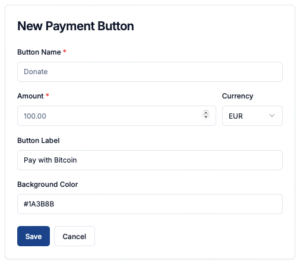
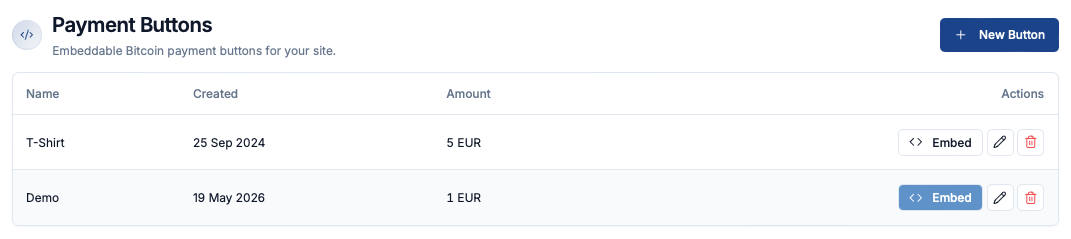
OConfiguration of a Bitcoin Payment Buttonpen your Coinsnap dashboard, navigate to Payment Tools [1] → Payment Buttons [2], and click New Button [3]. You will then be taken to the New Payment Button page, where you can define the basic parameters for your Bitcoin payment button.
Start by entering a Button Name to identify the button internally (e.g. “Donate” or “T-Shirt”). Then set the Amount and select the Currency in which the payment should be displayed. The Button Label defines what your customer will see on the button itself, such as “Pay with Bitcoin.”

Finally, you can customize the appearance by setting a background color that matches your website or brand.

Once all fields are configured, click Save to generate your payment button.

If you are using a CSS theme on your website, these settings will be overwritten by the values of the theme. This ensures that the button matches your website CI.

How to use the Payment button

Payment Buttons overview

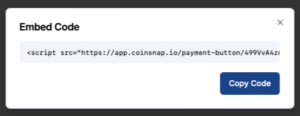
Copy the embed code for your Bitcoin payment button Click the Embed button on the right to open a window with the HTML embed code for your Bitcoin payment button. Click Copy Code and paste the snippet into your website where you want the button to appear.

On your website, the button appears like this and opens a QR code on click, allowing your customers to pay instantly with Bitcoin.

Sell a T-Shirt with the Bitcoin payment button

If you would like to integrate such a payment button on your website, open a Coinsnap account now and create your own customised Bitcoin payment button.

HTML Bitcoin Invoice Form

Bitcoin invoice payment made easy – with the Coinsnap HTML Bitcoin Invoice Form

If you invoice your customers for services and typically get paid via bank transfer, but customers ask to pay with Bitcoin, you can now offer a simple alternative:

With the Coinsnap HTML Bitcoin Invoice Form, your customers can pay any invoice with Bitcoin (On-chain + Lightning) without requiring a full webshop or payment gateway.

The form can be:

  • embedded directly on your website (HTML version), or
  • shared as a payment link to a ready-to-use Coinsnap-hosted payment form

Both options lead to the same result: fast, direct payment into your Bitcoin wallet.

How can customers pay invoices with Bitcoin using Coinsnap?
Customers open a Bitcoin Invoice Form (via a link or a website page), enter the invoice amount and reference details, and complete the payment by scanning a QR code. Payments are made instantly via Lightning or on-chain and are sent directly to the merchant’s Bitcoin wallet.


How to create your Bitcoin Invoice Form

Create a new HTML Bitcoin invoice form

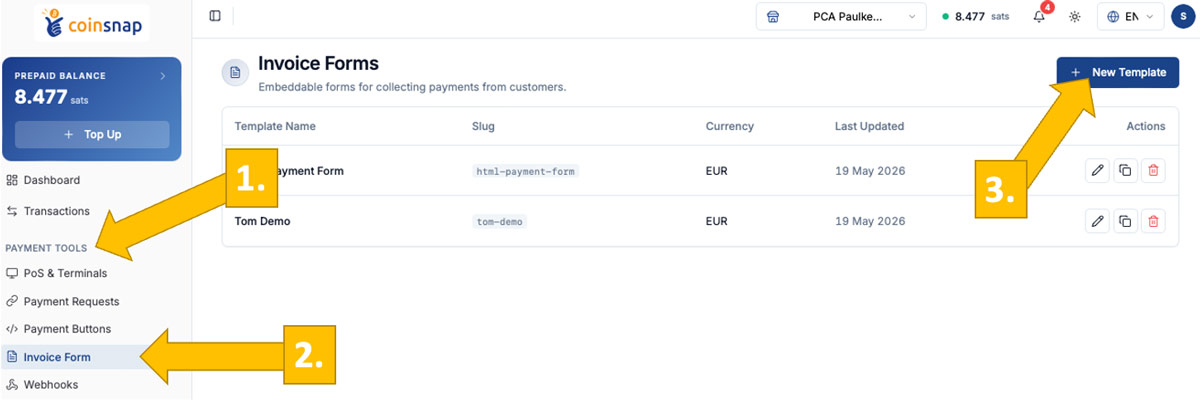
After logging into your Coinsnap dashboard, go to: Payment Tools [1] -> Invoice Form [2], and click New Template [3].

You will then be taken to a configuration page where you can set up your invoice form. (-> step-by-step user guide)

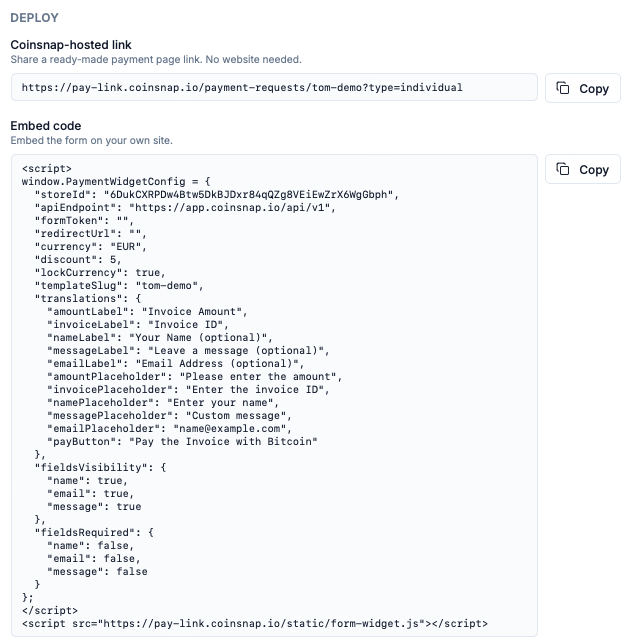
After saving your configuration, you will see both the payment link to the hosted invoice form and the embed code for your website.

Deployment: Use Coinsnap link or embed code on your own website

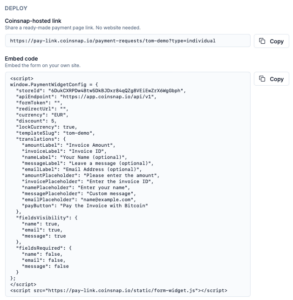
Deploy the Bitcoin Invoice Form with html embed code or a linkYou can deploy the Bitcoin Invoice Form in two ways, depending on how you want to use it.

The simplest option is the Coinsnap-hosted payment link: you generate a universal link in the dashboard, and Coinsnap provides a ready-to-use payment page where your customers enter their invoice details and complete the payment—no website integration required.

Alternatively, you can use the HTML embed code to integrate the form directly into your own website. In this case, the form becomes part of your page, and you simply share the URL of that page (e.g. a dedicated “Pay Invoice” page) with your customers in your invoices.

Simple, straightforward payment experience for your customer

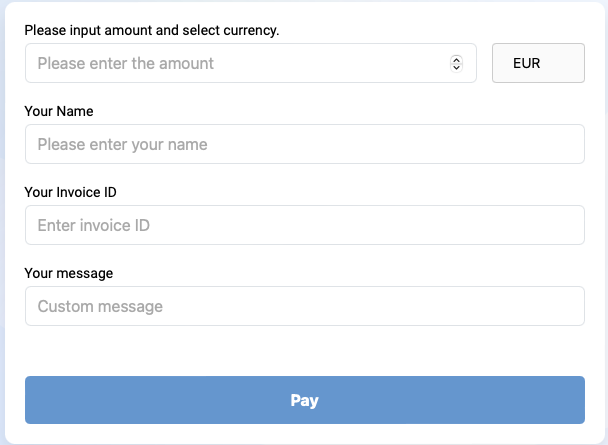
Bitcoin Invoice Form hosted by CoinsnapThe payment process is designed to feel familiar and requires no learning curve.

Your customer enters the invoice amount, invoice number, and their name—similar to a standard bank transfer—and can optionally add a reference message.

With one click on “Pay with Bitcoin,” the payment screen opens with a QR code, allowing instant payment via Lightning or, if preferred, on-chain for larger amounts.

The Bitcoin Invoice Form makes invoice payments faster and easier for you and your customers

The Coinsnap Bitcoin Invoice Form gives you a flexible and efficient way to accept Bitcoin payments for invoices—either by embedding the form on your own website or by using a simple, ready-to-share payment link.

For you as the payee, it removes the typical friction of bank transfers: no IBAN errors, no incorrect references, no delays, and no chargebacks. Payments arrive directly in your Bitcoin wallet, with Lightning enabling instant settlement.

For your customers, the process is just as straightforward. They enter the invoice details as they would in online banking and complete the payment instantly via QR code—fast, intuitive, and without the need to manually copy bank details or reference numbers.

Whether you choose the HTML version or the hosted payment link, the result is the same: a simple, reliable, and modern way to handle invoice payments with Bitcoin.

Start accepting Bitcoin invoice payments today

Set up your HTML Bitcoin Invoice Form or payment link in just a few steps and start receiving Bitcoin payments directly in your wallet—without changing your existing invoicing workflow.

  • No webshop or payment gateway required
  • Works with any invoicing process
  • Instant payments via Lightning
  • No chargebacks, no intermediaries

👉 Go to the HTML Bitcoin Invoice Form

FAQ – what’s good to know

What is a Bitcoin Invoice Form?

A Bitcoin Invoice Form allows your customers to pay invoices by entering invoice details and completing the payment via Bitcoin or Lightning, without requiring a webshop or payment gateway.

Do I need a website to use the Bitcoin Invoice Form?

No. You can either embed the form on your website using HTML or use a Coinsnap-hosted payment link that works without any website integration.

How do customers pay an invoice with Bitcoin?

Customers enter the invoice amount and reference details, then scan a QR code to pay via Lightning (instant) or on-chain.

What is the difference between the HTML form and the payment link?

The HTML form is embedded on your website, and you share the page URL with your customers.

The payment link is hosted by Coinsnap and can be sent directly via email, invoice, or message.

Do I receive the payment directly?

Yes. Payments are sent directly to your connected Bitcoin or Lightning wallet.

Can I use one form for all invoices?

Yes. The same form or link can be used for all invoices—your customers simply enter their individual invoice details when paying.

Get Paid in Bitcoin with the Coinsnap Payment Link

Get paid in Bitcoin with the Bitcoin Payment Link

Let your customers or clients pay their bills with Bitcoin

You have written an invoice to your customer and would like this invoice to be paid via Bitcoin Lightning?

With Coinsnap’s Bitcoin Payment Link you can send each of your customers a payment link that looks similar to this one:

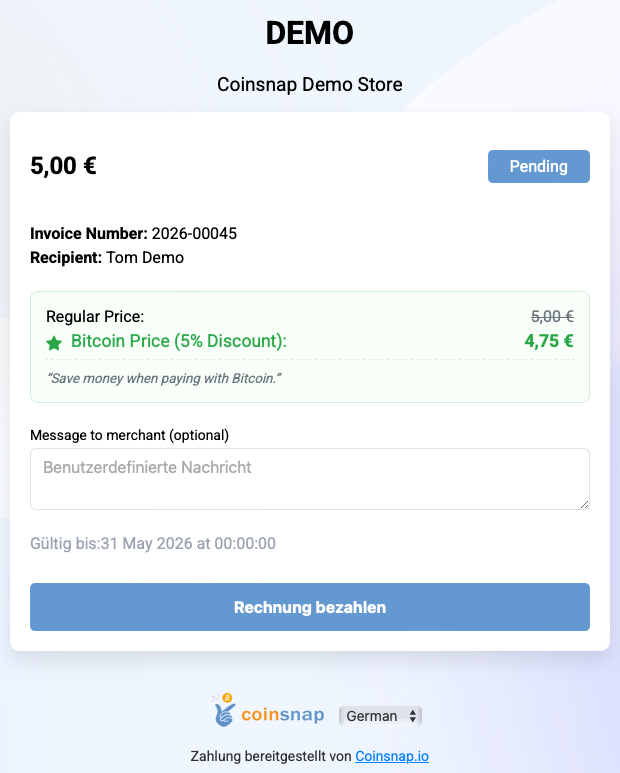
When your customer clicks on the Bitcoin payment link, a payment page opens with all the relevant information about this invoice.

Payment Link payment interface

The customer clicks on Pay Invoice and is shown a QR code with which the invoice can be paid via Bitcoin Lightning.

As the payee, the invoice amount is credited directly to your own Bitcoin wallet.

Having your customers pay you with Bitcoin is particularly convenient for you as a payee with Coinsnap Pay-Link.

As a merchant, you enter the invoice amount in euros and if your customer pays a few days after receiving the invoice, the exchange rate at the time of payment is used.

In this way, you protect yourself against the risk of the Bitcoin exchange rate between the time of invoicing and the time when the invoice is actually paid.

How can I get paid in Bitcoin with a payment link?
With Coinsnap, you create a Bitcoin payment link in your dashboard and send it to your customer. When the customer opens the link, they see a pre-filled payment page and can pay the invoice instantly via Bitcoin using a QR code. The payment is sent directly to your wallet.

How to create a Bitcoin payment link?

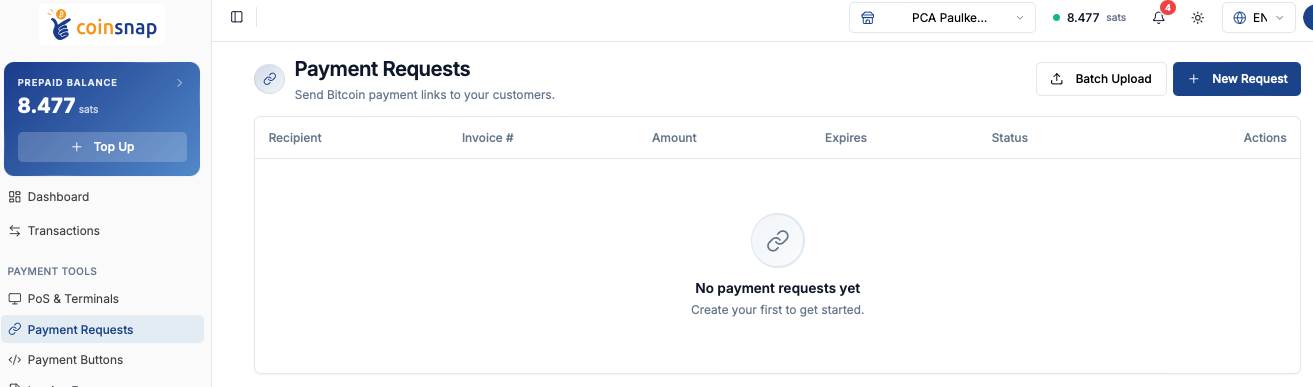
To create a payment link, you need a Coinsnap account. After you have logged in to the Coinsnap dashboard, go to Payment Tools -> Payment Requests.

Create a new Payment Link

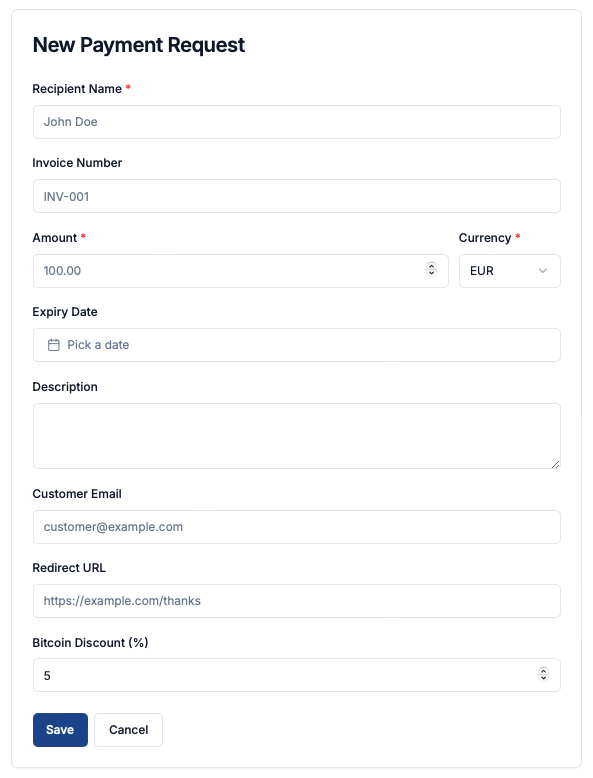
To create a new payment link, click Create Payment Link in the top right corner. Then fill out the form you are directed to.

The Payment Link form

Click Save once you have configured the payment request. You will then see the overview screen, with your newly created payment link displayed at the top.

Payment Links overview

You can copy the payment link (URL) by clicking the copy icon on the right under Actions.You can copy the payment link (URL) by clicking the copy icon on the right under Actions.


You can add this payment link to your invoices or include it in the email when sending an invoice to your customer.

When the customer opens the link, they are taken to a pre-filled payment page, where they simply click Pay Invoice and complete the payment via QR code.

Prefilled payment page created and hosted by Coinsnap

Tags:Bitcoin Pay-Link Bitcoin Payment Link Pay-Link Payment Link

Coinsnap presents Web Point of Sale

Coinsnap presents Web Point of Sale

5.9.2024 – Coinsnap now offers a new, innovative way for entrepreneurs to accept Bitcoin Lightning payments quickly and easily in the “real” world: With the introduction of the Web-PoS solution, small and medium-sized businesses such as retailers, restaurants, craftsmen and service providers etc. have a simple, secure and efficient way to integrate Bitcoin Lightning payment into their everyday business – without complicated technology or expensive hardware.

How does the Coinsnap Web PoS solution work?

The Coinsnap Web Point of Sale (Web PoS) solution allows vendors and their employees to accept Bitcoin Lightning payments directly from the web browser of their smartphone, tablet or computer. After logging in to their personal Web Point of Sale page, they simply enter the invoice amount via the convenient input field. The payment amount is then either credited to your Bitcoin Lightning wallet or, if desired, automatically converted into a fiat currency such as Euro, USD, GBP or CHF and transferred to the bank account on file.

One of the greatest strengths of this system is its flexibility: sellers do not need to install an app, but simply access their individual Web PoS page provided by Coinsnap via the browser. This URL can also be shared with employees who can accept payments without having access to the wallet or business accounts.

Why should sellers accept Bitcoin Lightning payments?

  1. Simple integration and use: No complicated technical setup is required. The Web PoS solution runs on any internet-enabled device and is ready for immediate use after a simple setup in the Coinsnap backend (5 minutes max.!).
  2. Guaranteed payment: Bitcoin Lightning payments are credited to the merchant’s wallet in real time, a chargeback of the payment is technically not possible.
  3. Security for entrepreneurs: employees can accept payments without having access to the company’s finances. It will soon also be possible, for example, to credit employees’ tips or revenue shares directly to their personal Bitcoin Lightning wallets.
  4. Fast transaction processing: Bitcoin Lightning payments are credited in real time, which prevents long waiting times or delays. Sellers can track the receipt of funds directly on their wallet or bank account.
  5. Detailed transaction overview: Coinsnap offers a comprehensive overview of all transactions with the option of exporting data in CSV format – ideal for accounting purposes and documenting business transactions.
  6. No app installation necessary: The entire process can be handled directly via the browser, saving time and resources.

Who is the Web-PoS solution ideal for?

The Coinsnap Web PoS solution is aimed at a wide range of entrepreneurs – from café owners to retailers and service providers. Especially for businesses that do not have or do not want an extensive technical infrastructure, this solution offers an easy entry into the world of cryptocurrency payments. Thanks to the ability to receive payments in fiat currencies, sellers do not necessarily need to be Bitcoin experts to benefit from the solution.

Conclusion

With the new Web PoS Bitcoin Lightning solution, Coinsnap offers a forward-looking, secure and flexible payment method for companies of all sizes. Anyone who wants to offer their customers a modern and fast payment option should consider the Coinsnap Web-PoS solution. Especially in times when cashless and digital payments are becoming more and more important, this could be the decisive step towards a future-proof business model.

For more information and how you can use the Coinsnap Web PoS solution for your company, please visit:

https://coinsnap.io/pos-bitcoin-payment

Web-Point of Sale

Accept Bitcoin on-site with Coinsnap Web-Point of Sale

The simple Bitcoin Lightning payment method for stores, restaurants, suppliers, hotels, etc. Works with any device!

Web-Point of Sale Keypad

Do you run a store, a restaurant or are you a craftsman and service provider and would like to accept Bitcoin Lightning payments from your customers? Then Coinsnap ‘s Web-Point of Sale solution is the ideal solution for you!

Just open your web-point of sale page on-site on the web browser of your smartphone, computer or tablet and enter the invoice amount via the keypad input field.

Then a QR code will appear, which your customer scans briefly with their Bitcoin Lighning app and then authorizes.

The invoice amount will be credited directly to your Bitcoin Lightning Wallet – or (if desired) deposited directly into your bank account in fiat currency such as euros, USD, GBP or CHF.

The Coinsnap Web-Point of Sale works as simply as this

In addition to the invoice amount, you can also enter an order number so that you can easily allocate the Bitcoin payment later in your accounting system. After you have entered the amount, click on Charge and a QR code will be displayed, which you can show to the payer so that they can make the payment with their Bitcoin Lightning Wallet.

If the payment was successful, you will receive a message and can hand over the paid goods to the customer. The Bitcoin revenue is immediately credited to your own Bitcoin Lightning Wallet and is immediately available to you. You can note in your POS system or on the invoice that the payment was made via Bitcoin Lightning.

All Bitcoin Lightning payments received via the web point of sale are saved in the Coinsnap backend and can be tracked via the transaction view. All payments can be filtered and downloaded as a CSV file to be used for accounting purposes, for example.

Create Web-Point of Sale

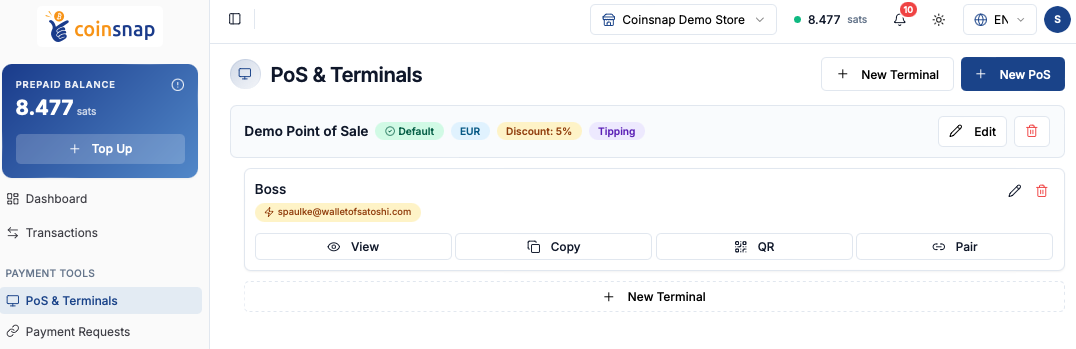
To be able to use the web-point of sale for your business, you need a Coinsnap account. After you have logged in to the Coinsnap backend, you will find the menu item Payment tools in the left menu bar and there the item Web Point of Sale (Web PoS).

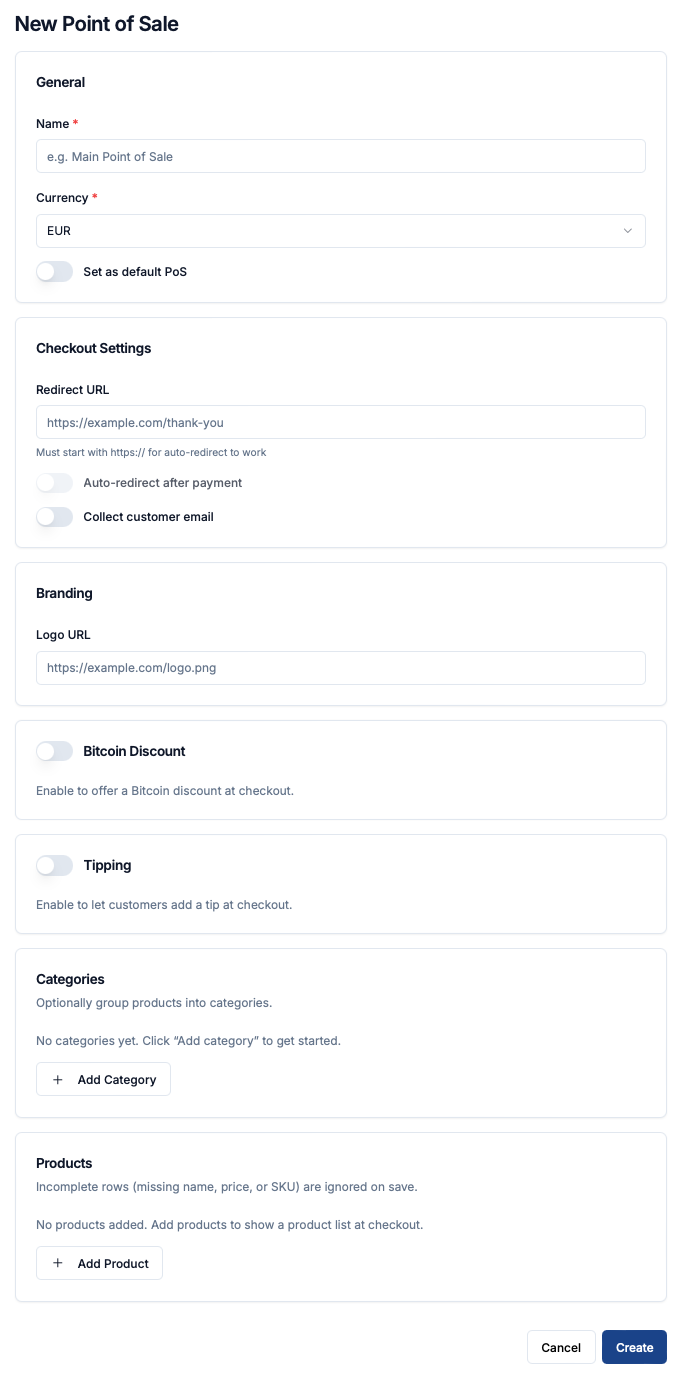
Click on Create New PoS to create a new Web-Point of Sale. Then enter the name of your store in the PoS Name field and in the PoS Title line you can specify what your store offers. In the Currency field, select the currency that will be used for payment in your store.

Then click on Create PoS. This view appears:

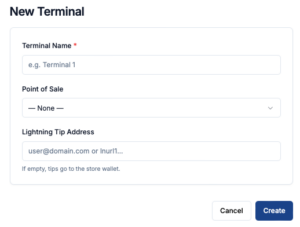
With Copy Link you receive the URL, which you can access with any internet-enabled device. This URL can also be passed on to employees, so that they can access the site with their own end devices. Only payments can be received via this Web-PoS Url. The credit to the Bitcoin Lightning Wallet is made to the wallet deposited with Coinsnap.

The advantages of Coinsnap Web-Point of Sale at a glance:

  • Every employee can accept Bitcoin payments, but cannot make withdrawals.
  • Web-PoS can be operated on any Internet-enabled device with an Internet browser such as a smartphone, computer or tablet.
  • Separation of business and private Bitcoin Lightning payments
  • Enter your own order and invoice numbers for easy tracking
  • Detailed transaction view with CSV export for accounting documentation
  • No app installation required

Register now and get started with Web PoS!

Tags:Bitcoin Web-Point of Sale Bitcoin Web-PoS Web-Point of Sale Web-PoS